
Monitor
p=none
Collect reports and check legitimate sending services. No stricter handling is requested at first.
DMARCify
Understand senders, detect anomalies and protect your domain more strongly step by step. DMARCify combines readable reports with AI-supported policy management.
The functions for getting from overview to a stricter policy and for day-to-day operation.
AI-supported policy management assesses how reliably your senders are authenticated. It takes sending sources and forwarding into account and supports tightening your DMARC policy step by step.
Your benefit. Less manual evaluation before every policy change. You set the frame; if results worsen or conspicuous unknown sources appear, the automation pauses.
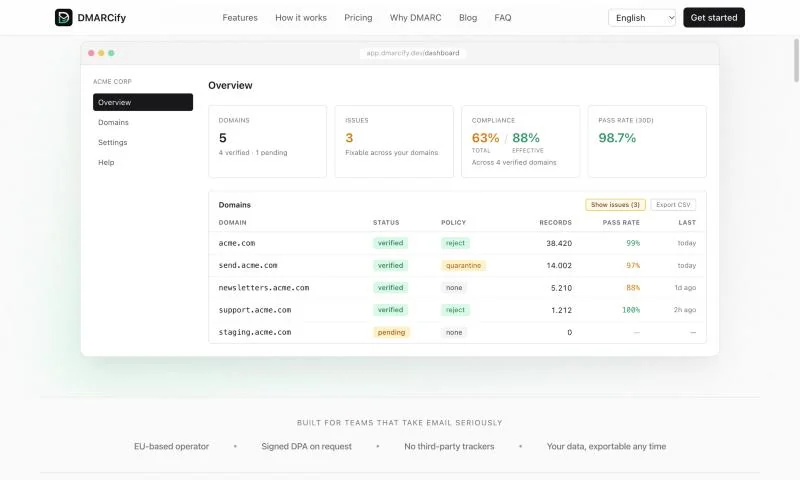
DMARCify makes technical XML reports readable. Sending sources get context on provider, network operator and origin; SPF and DKIM results are shown per source.
Your benefit. Less guesswork with unknown IP addresses. Your team sees which services send correctly and which sources should be examined more closely.
DMARCify checks the DNS record regularly and detects unusual changes in sending. Daily or weekly digests keep your team up to date.
Your benefit. Fewer routine checks in the dashboard. Your team can focus its attention on changes that need a review.
In the Agency plan you manage clients in separate organisations. Roles, quick organisation switching and your own branding support the collaboration.
Your benefit. Less switching between separate tools. Agencies and IT service providers support several clients with clear responsibilities and one consistent workflow.
You start with transparency. The AI supports the move to stricter policies as soon as the defined conditions are met.
p=none
Collect reports and check legitimate sending services. No stricter handling is requested at first.
p=quarantine
Receivers are asked to treat messages that fail the DMARC check separately, for example in the spam folder.
p=reject
Receivers are asked to reject messages that fail the DMARC check. Legitimate sending routes should have been checked beforehand.
DMARCify combines DNS integrations with a REST API and MCP access for AI agents. Domain status, reports and sending sources thus become part of your workflows.
Discuss my integrationCloudflare, Vercel, Azure DNS, AWS Route 53, Google Cloud DNS and GoDaddy. Alternatively you use the generated TXT record manually.
Retrieve domain information, reports and sources via the REST API. Integrate recurring evaluations into your existing tools.
Via MCP, agents can evaluate domain status and reports. Read access is enough for pure diagnostics; changes to domains or DNS explicitly require write access.
We clarify which services send for you and how DMARCify fits your team, your domains and the level of automation you want.
Connect the DNS provider or set the TXT record. The reporting address per domain lays the basis for monitoring.
Evaluate sources and check results. Examine unknown senders and classify legitimate sending routes correctly.
Use recommendations or enable automation. Determine conditions, responsibilities and the scope of changes.
AI-supported policy management assesses the results of the email checks, the make-up of your senders and forwarding. It supports the path from p=none via p=quarantine to p=reject. Reports, source attribution and SPF/DKIM results provide the basis.
By default you receive recommendations. You enable automatic changes explicitly per domain and within the defined conditions. Adjustments are logged with the underlying data and can be rolled back. If alignment drops or unknown senders rise, the automation pauses.
SPF checks authorised sending servers. DKIM works with a digital signature. DMARC checks whether at least one of these passing mechanisms aligns with the visible sender domain and defines which handling is requested if the check fails. DMARCify makes the related reports readable.
Yes. With p=none you start in monitoring mode. Before a stricter policy is applied, you check your legitimate sending services and their authentication. The next step depends on the reports and the conditions defined for your domain.
Direct integrations exist for Cloudflare, Vercel, Azure DNS, AWS Route 53, Google Cloud DNS and GoDaddy. Alternatively you publish the generated TXT record manually. DMARCify detects the record and provides a dedicated reporting address per domain.
Pro is aimed at teams looking after their own domains and includes AI-supported policy management. Agency adds client organisations, white-label and handover to clients. Special enterprise requirements such as SSO, a custom SLA or retention periods are clarified in a call. You can export your data.
The dedicated site
The DMARCify product website is available in seven languages, including English and German. It is aimed at teams, agencies and IT service providers who look after domains themselves.
 Open site
How the group works together
One domain or many client organisations: we show you how to keep track of sending sources and use the AI control for your case.